On this page
Why creators look beyond TikTok's built-in voice
TikTok's text-to-speech turns the text you type in the editor into a voice that plays as the text appears on screen, which TikTok has described as an accessibility feature (TikTok newsroom). It costs nothing extra and needs no other app, so for reading out a caption it is hard to beat.
Its limits are what send people elsewhere. The voices are shared by millions of accounts, so viewers recognise them at once, and the narration lives inside TikTok's editor rather than as an audio file you own. If you post the same video to Instagram Reels or YouTube Shorts, or want your channel to have a voice of its own, you need a generator that gives you the audio. TikTok's help page for text-to-speech did not load for us on 26 October 2026, so we do not describe its menus or its language list here.
One rule applies whichever tool you use. TikTok asks creators to label AI-generated content that contains realistic images, audio or video, and its examples include a real person shown saying something they did not say, such as AI-generated speech (TikTok support). TikTok says turning on the AI-generated content setting does not affect a video's distribution as long as the video follows its Community Guidelines. A clearly synthetic narrator reading your own script is not one of TikTok's listed examples, but if a voice could pass for a real person, label it.
AI voice generators for TikTok compared
The table compares seven options on the facts that decide whether a free tier is usable for TikTok: can you download the audio, and may you post it on a monetised account. Every fact comes from the tool's own pricing, help or product pages, checked on 26 October 2026. Where we could not confirm a fact on the tool's own pages, the table says so rather than guessing.
Free tiers fail creators in two ways. Some let you listen but not download: Murf's help centre says downloading and exporting projects is only available on a paid plan (Murf help). Others let you download but not publish commercially: ElevenLabs says its free plan cannot be used for any commercial purpose and that free users must credit it by putting "elevenlabs.io" or "11.ai" in the title (ElevenLabs help). Narakeet lists commercial use as "No" for free accounts (Narakeet pricing). On a creator account that earns from the Creator Rewards Program or brand deals, either restriction rules the free tier out.
Two free options do allow commercial use. TTSMaker's homepage says its audio may be used for any lawful purpose, including commercial use, with a limit of 20,000 characters a week (TTSMaker). CapCut says audio from its text-to-speech tool can be used for commercial purposes, provided you follow its terms of use (CapCut). Sonex Labs, which publishes this blog, also allows commercial use on its free tier, with no attribution.
| Tool | Languages | Free tier | Price | Commercial use | Voice cloning |
|---|---|---|---|---|---|
| TikTok built-in text-to-speechSource: TikTok newsroom; help page did not load, 26 Oct 2026 | [TBD] | Built into TikTok's editor; any limits [TBD] | [TBD] | [TBD] | [TBD] |
| CapCut text to speechSource: capcut.com/tools, checked 26 Oct 2026 | "Dozens" of languages and over 200 voices, by CapCut's count | Free; some premium voices need CapCut Pro | CapCut Pro: [TBD] | Yes, under CapCut's terms of use | Yes, from a few sentences you record |
| ElevenLabsSource: elevenlabs.io pricing and help, checked 26 Oct 2026 | 70+ on its Eleven v3 model | 10,000 credits a month; credit "elevenlabs.io" in the title | Starter $6 a month (30,000 credits); Creator $22 a month | Paid plans only | Instant cloning from Starter; professional cloning from Creator |
| MurfSource: murf.ai and help.murf.ai, checked 26 Oct 2026 | 35 languages | 10-minute trial; no downloads | [TBD] | Paid plans | [TBD] |
| NarakeetSource: narakeet.com pricing and languages, checked 26 Oct 2026 | 112 languages, 946 voices | 20 files, audio scripts up to 1 KB | From $6 for 30 minutes, one-time credits that do not expire | Paid (commercial) accounts only | Not listed on its pricing page |
| TTSMakerSource: ttsmaker.com, checked 26 Oct 2026 | Many, including English; total [TBD] | 20,000 characters a week; some voices unlimited | Paid plans: [TBD] | Yes, including on the free tier | [TBD] |
| Sonex Labs (Pāṇini TTS)Source: sonexlabs.com/pricing, 26 Oct 2026 | 250+ languages | Play 220 characters at a time on the website, no account; 10,000 characters and one voice clone after free signup, no card | $0.03125 per 1,000 characters, pay as you go | Yes, on free and paid, no attribution | One free clone from a 10-second sample |
Three voices to try for TikTok narration
A short list beats scrolling a library of hundreds. These three Pāṇini TTS voices from the Sonex Labs catalogue cover the three jobs most TikTok narration does: an upbeat hook for tutorials and product videos, a warm conversational read for vlogs and food, and a calm storyteller for history and nature. Each sample is a line a creator might actually post, under the 220 characters you can play on the website without an account.
Jonathan is an American voice listed as energetic and professional, the closest of the three to a classic TikTok hook. Liz, also American, is warm and expressive and suits a day-in-the-life or food video. George is a calm British narrator for explainers and slower stories. Play all three with your own first line on the TikTok voice generator page before you commit, because a voice that sounds right on a sample can feel wrong on your topic.
Every voice there speaks in its own style. Pāṇini TTS has no style presets such as whisper or news anchor, no pitch control and no child voice, so if your format depends on one of those, a different tool will serve you better.
Okay, stop scrolling. This five-minute pasta uses three things you already have, and the last step is the one everyone skips.
So this is the little bakery at the end of our street. They open at six, sell out by nine, and the cinnamon rolls are the reason why.
Three years ago this field was a car park. Now it's home to more than forty kinds of wildflower, and it all started with one neighbour and a bag of seeds.
How long a TikTok voiceover script should be
Time one line in the voice you chose, then scale up, because reading speed changes more between voices than between scripts. Word-count rules written for human narrators tend to run short with AI voices. Baruch College's Tools for Clear Speech programme, citing the National Center for Voice and Speech, puts the average English speaker at about 150 words a minute, and default text-to-speech voices tend to read faster than that.
The three samples above show how wide the spread is. Rendered on 26 October 2026 at normal speed, the upbeat hook took 5.7 seconds for 21 words, about 220 words a minute, while the warm vlog read came to about 183 and the calm storyteller about 201. A 30-second TikTok therefore holds roughly 90 words in one of these voices and 110 in another. These are single short lines, including a fraction of a second of silence at each end, so treat them as a starting point: play your own opening line, note how many seconds it takes, and size the rest of the script from that. Our voiceover timing guide explains the method in detail.
Speed is the other lever. Pāṇini TTS accepts a speed from 0.5 to 2.0, but only as an API parameter; the website plays every voice at its normal pace. Cutting a sentence usually sounds better than speeding a voice up.
From script to a posted TikTok
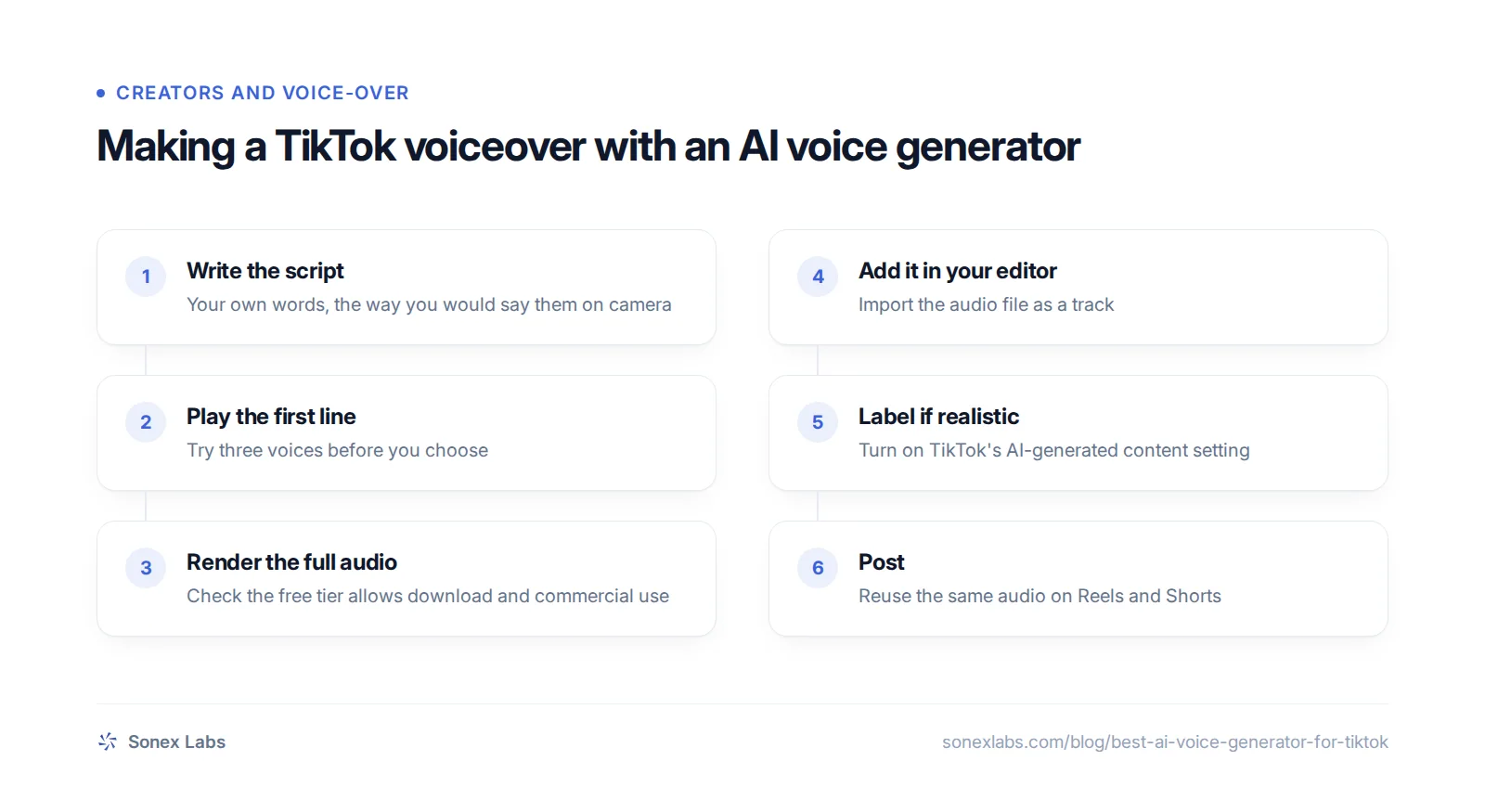
The workflow is the same with any generator: write, test, render, edit, label and post. What differs is where the audio comes from and whether you are allowed to keep it.
With Sonex Labs, the website plays audio in the browser only. To get a file, sign up free: the dashboard saves a WAV file with its Download audio button, and the API returns MP3 if you ask for it. Then add the file to your video in the editor you already use. CapCut's own guide describes adding text-to-speech on desktop from the Text panel and exporting the finished project; to use outside audio instead, import the file as you would any music track. Sonex does not post to TikTok for you and has no mobile app.
Before you post, check two things. If the voice could pass for a real person, turn on TikTok's AI-generated content setting, which TikTok's help page places under More options before you post. And if you cloned a voice, make sure it is your own or that you have the speaker's clear consent; the voice cloning page explains how a 10-second sample becomes a voice that reads your scripts. For Reels, the same audio works; see AI voice for Reels.
Where Sonex Labs fits, and what it does not do
Sonex Labs is a good fit if you want commercial use on a free tier, a voice clone of your own voice, or narration in a language most tools read poorly. 10,000 free text-to-speech characters and one free voice clone that speaks every language, no card required. After that the price is $0.03125 per 1,000 characters, the same rate for every language. The same clone reads every supported language, with your accent carrying over, which helps if you post in English and in Hindi, Bangla or Urdu; see our guides to Hindi AI voices for Reels and Bangla and Urdu AI voices.
It is a poor fit if your format needs effects. There are no style presets, no pitch control, no child, character or celebrity voices, no voice changer, and no sound effects or music. The website has no download button and no speed control, so a file always means a free account first.
Questions people ask
Not on a monetised or brand account. ElevenLabs says its free plan cannot be used for any commercial purpose, and free users must credit it by putting "elevenlabs.io" or "11.ai" in the title. All paid plans include a commercial licence; on 26 October 2026 Starter was listed at $6 a month.
On 26 October 2026, TTSMaker said its free audio may be used commercially, up to 20,000 characters a week, and CapCut said its text-to-speech audio can be used commercially under its terms. Sonex Labs allows commercial use on its free 10,000 characters with no attribution. ElevenLabs, Murf and Narakeet restrict their free tiers.
TikTok asks creators to label AI-generated content that contains realistic images, audio or video, such as a real person shown saying something they did not say. Its help page places the AI-generated content setting under More options before you post, and says the label does not reduce distribution for videos that follow its guidelines.
Yes, with several tools. ElevenLabs includes instant cloning from its $6 Starter plan, CapCut builds a voice from a few sentences you record, and Sonex Labs gives one free clone from a 10-second sample. Clone only your own voice, or someone's with their clear consent, and never a public figure.
Sources
- TikTok Support: AI-generated content (labelling rules and setting), read via search index 26 Oct 2026Official
- TikTok Newsroom: Refreshing our policies to support community well-being (text-to-speech), read via search index 26 Oct 2026Official
- CapCut: Text to speech tool (free, commercial use, voice clone, steps), checked 26 Oct 2026Official
- CapCut: AI text to speech (free, premium voices on Pro, commercial projects), checked 26 Oct 2026Official
- ElevenLabs: Pricing (Free, Starter, Creator), checked 26 Oct 2026Official
- ElevenLabs Help: Can I publish the content I generate (free plan, attribution), checked 26 Oct 2026Official
- ElevenLabs Docs: Models and supported languages, checked 26 Oct 2026Official
- Murf: Hindi text to speech (free trial, 35 languages), checked 26 Oct 2026Official
- Murf Help: Can I download my project during the free trial, checked 26 Oct 2026Official
- Murf Help: Do I have commercial rights over the voice-over created, checked 26 Oct 2026Official
- Narakeet: Pricing (free accounts, packages, commercial accounts), checked 26 Oct 2026Official
- Narakeet: Languages and voices, checked 26 Oct 2026Official
- TTSMaker: Free text to speech (weekly limit, commercial use), read via search index 26 Oct 2026Official
- Baruch College Tools for Clear Speech: speaking rate (about 150 words a minute)Secondary