On this page
- Why order and timing matter more than the choice of model
- Measure how your calls arrive before choosing any hardware
- Choose which component to move first
- The smallest deployment that survives a failure
- Rent first, reserve the floor, buy rarely
- Load-test on your own calls before you commit
- Metrics that tell you when a component stops paying
- Sources
Why order and timing matter more than the choice of model
Most self-hosting guides end when the model answers its first test request. The money question arrives a month later, with a GPU bill for every hour of the night in which nobody called. A rented GPU costs the same idle or busy, while the API it replaced charged only for minutes used, so the deployment has to be judged on cost per call-minute at the utilisation your calls actually produce.
That one test decides both the order and the timing of every step below. The full cost model, with the people who run the system and break-even volumes at 100,000, 1 million and 10 million minutes a month, is in the true cost of self-hosting voice AI. This guide is the practical companion: what to measure, what to build and when to commit money.
A note on interest: Sonex Labs sells hosted speech and LLM APIs, such as the Vyas LLM API, so it sits on the API side of this trade. Every figure here is sourced or worked in the text, so you can rerun it with your own inputs.
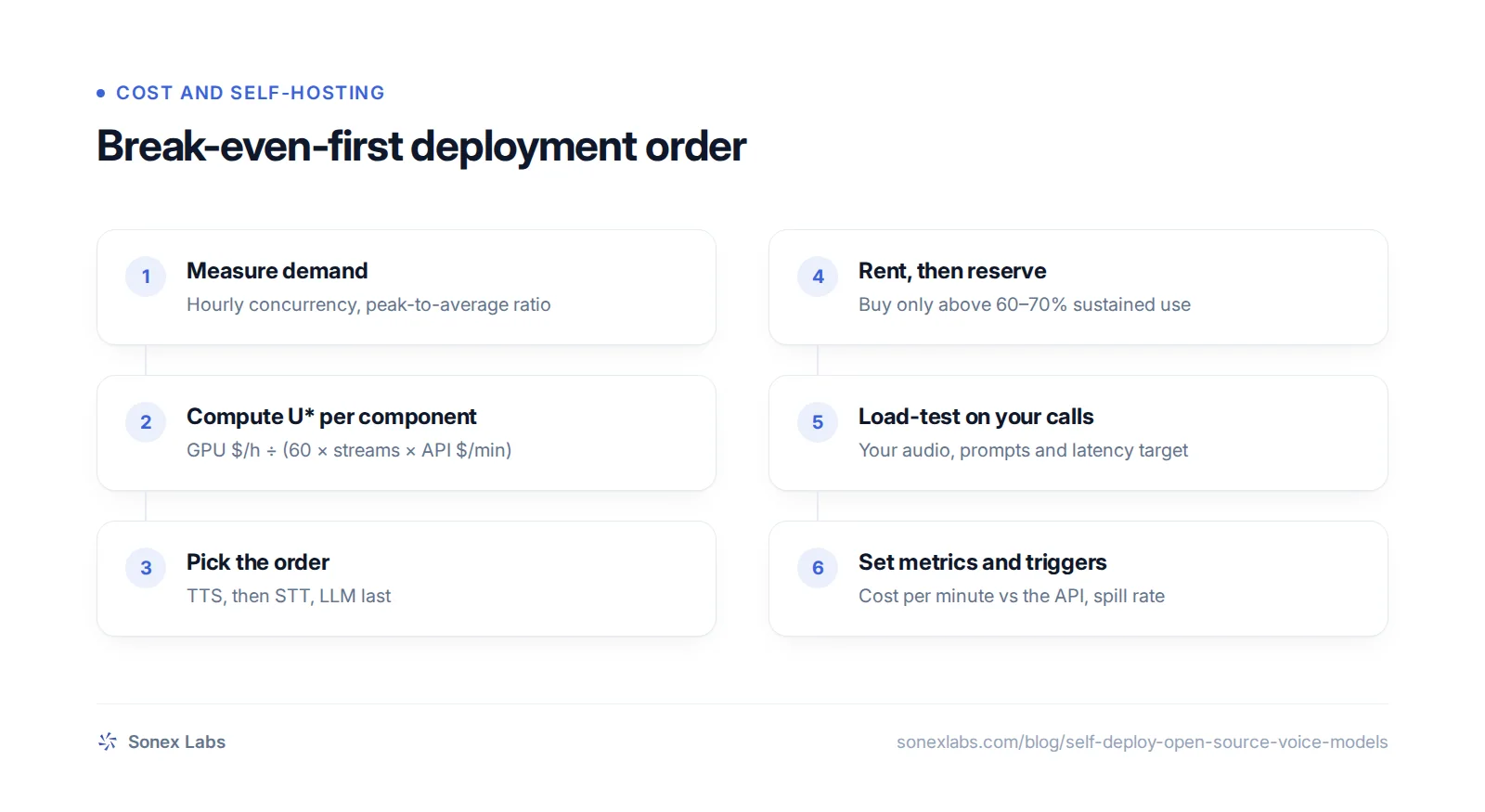
Measure how your calls arrive before choosing any hardware
Start with an hourly histogram of concurrent calls over at least four normal weeks, excluding holidays and one-off campaigns. Concurrent calls means calls in progress at the same moment, and it is what a GPU has to carry. Your telephony provider or call logs give start and end times, which is enough to count calls in progress for each hour of the week.
Two numbers come out of it. The first is the peak-to-average ratio: the busiest hour's concurrency divided by the average across all 168 hours of the week. You must size for the peak plus headroom, so your utilisation can never exceed roughly 1 ÷ (ratio × 1.2) with 20% headroom. The second is the overnight floor, the lowest concurrency you carry at 3 a.m., which is the only load you can safely commit to for a year or more.
A business-hours inbound line typically shows a ratio of about 3.5, which caps utilisation near 24% before spare GPUs are counted; the cost model works this through at three volumes. If you have no call history yet, you cannot size a fleet, and the right move is to start on APIs and collect the data.
The curve can also be changed. Customers in several time zones, outbound campaigns scheduled into quiet hours, and batch work such as post-call transcription or evaluation runs all fill the troughs without adding hardware. Raising utilisation this way is worth as much as a cheaper GPU.
Choose which component to move first
With utilisation known, compare it with each component's critical utilisation, the busy share above which a GPU costs less than the API on hardware alone. It is the GPU's hourly price divided by (60 × streams per GPU × the API's price per call-minute). Use the API price you actually pay, after any discount, not the list price.
Against October 2026 list prices it comes to about 5 to 6% for speech to text (STT) and text to speech (TTS), and about 48% for a language model (LLM) against a cached mini-class API. Any realistic call curve clears the speech thresholds and almost none clears the LLM one. The table and a three-input calculator are in critical utilisation for STT, TTS and LLMs.
Discounts change the answer, so get your real price before deciding. Azure's published speech commitment tiers, for example, bring real-time STT down to $0.40 an hour at its largest tier against $1.00 pay-as-you-go, and TTS to $7.50 per million characters against $15. A cheaper API minute raises the busy share your GPU needs.
TTS first for cost, STT first for ease
TTS carries the largest API bill per minute, so it usually saves the most. STT has the cheapest GPU per stream, but STT APIs are already cheap, so the saving per minute is smaller. On cost alone, then, TTS goes first.
Softcery ranks them the other way on ease, calling STT "the near-free win" and TTS deceptively hard, because self-hosted TTS needs text normalisation, pronunciation fixes and often voice cloning (Softcery). Teams with strong audio engineers tend to start with TTS. Teams that want the easiest first deployment can start with STT and accept a smaller saving.
When the LLM is worth self-hosting anyway
Keep the LLM on an API unless volume reaches several million minutes a month, or you have a reason other than cost. The usual reasons are lower time to first token, a fine-tuned model the API cannot serve, or data that cannot leave your servers. Even then, owning only the base load and sending overflow to the API is usually cheaper than a fleet sized for the peak, as the burst-to-API design shows.
The smallest deployment that survives a failure
The minimum worth running is two GPUs in one region, each able to carry the whole load of the component, so one can fail without dropping calls. Two L40S cards cost $1,591 a month at RunPod's on-demand Secure Cloud rate ($1.09 × 730 hours × 2), or about $1,174 on a 3-year AWS reservation ($0.804 × 730 × 2). Both prices were checked on 24 October 2026.
Serve STT and TTS from a streaming inference server, such as NVIDIA's Riva and NIM containers or an equivalent, so that audio flows in and out as the call happens. Keep a live contract with an API for every component you move, with automatic routing to it when the GPU pool is full or unhealthy. A fallback you have not called in months is not a fallback.
Serving the LLM with prefix caching
A voice agent resends the same long system prompt, plus the conversation so far, on every turn. Serving engines such as vLLM and SGLang can keep the processed form of that shared prefix and reuse it. vLLM's automatic prefix caching skips recomputing the shared part, but it "does not reduce the time of generating new tokens" (vLLM docs), so it shortens the wait before the first word rather than the reply itself.
The gain depends on how long the shared prefix is and how often it repeats, and published community tests disagree on its size. Turn it on, then confirm from the server's cached-token counts that your prompts are actually being reused. A prompt that changes near the start on every turn, for example with a timestamp, defeats the cache.
Running all three models on one GPU
Putting STT, the LLM and TTS on the same card lowers the minimum fleet at small volumes, because two shared GPUs replace six dedicated ones. There is little published data on how many calls a shared card carries. Softcery models 200 to 400 sessions on one B200 serving all three, as a planning figure without measurements.
Treat co-location as something to load-test, not assume. Give each model a fixed share of GPU memory, so a burst of LLM requests cannot starve speech recognition in the middle of a call.
Rent first, reserve the floor, buy rarely
Rent on demand for the first three to six months of each component, while streams per GPU and the demand curve are still estimates. A commitment only pays once you know the overnight floor. Reserve one year of capacity for that floor once it has held steady for a few months, and three years only for load you can prove will run around the clock for three years. Current discounts by provider and term are in L4, L40S and H100 prices per hour.
Buying hardware lowers the hourly rate but does not fix low utilisation: an owned GPU that is busy 20% of the time costs five times its amortised rate per useful hour. Buy only with an operations team, a colocation contract and sustained use above about 60 to 70%. That threshold comes from GMI Cloud, a GPU-cloud vendor, so it leans towards renting.
- Spot or interruptible GPUs can be taken back at short notice, so keep them for batch jobs and evaluations unless a live call can move to another GPU mid-sentence.
- Serverless GPU platforms charge for warm capacity. Pipecat applies a 1.5x multiplier for region pinning on Modal, so two always-warm L40S containers there cost about $1.95 × 1.5 × 730 × 2 = $4,271 a month.
- Indian GPU clouds give data residency and shorter network paths, not a hardware discount, once 18% GST is added to their listed prices.
Load-test on your own calls before you commit
Streams per GPU is the number every cost formula divides by, and it is the least reliable input you will find. Vendor claims and measured tables differ by ten times or more: Cerebrium describes about 180 concurrent TTS conversations on one A10, while NVIDIA measures 32 TTS streams on an L40S for its multilingual model. Both can be true for different models, audio and latency targets, which is exactly why neither should go into your budget.
Budget a week to measure it yourself. Replay recorded calls and real prompts, with turns arriving in bursts as they do when many callers stop speaking at once, and raise concurrency until the 95th-percentile latency breaks your target. That level, not a vendor's figure, is your streams per GPU, and a 2x error in it doubles or halves the GPU bill. What a 24 GB GPU carries in concurrent calls shows a worked measurement.
Test the languages you actually serve. NVIDIA's tables show a multilingual code-switching streaming STT model averaging 7.6 seconds of latency at only 8 streams on an H100, against 48 to 64 low-latency streams for its English models (NVIDIA Riva ASR performance). If your callers mix Hindi and English, plan from the low end until your own test says otherwise.
Metrics that tell you when a component stops paying
Once a component is live, the job is to notice early when it stops paying. Tag every metric with the tenant or agent so cost per customer is visible, and review them weekly against the API price you replaced. Count the people too: Softcery estimates a dedicated inference team at $300,000 to $500,000 a year in the US, and on-call cover, evaluation runs for each model upgrade and the failover code all come out of that time. These are the measures to keep:
- Cost per call-minute per component (GPU spend ÷ minutes served) against the API price; alert when it stays above for 7 days.
- Utilisation against critical utilisation, hourly; release any GPU whose marginal utilisation stays below it for a reservation term.
- Peak-to-average ratio of hourly concurrency, the main driver of utilisation.
- 95th-percentile latency per component: STT final result, LLM time to first token, TTS first audio chunk, at the concurrency you load-tested.
- Fallback spill rate: the share of minutes served by the API, and what it cost.
- Word error rate on a fixed test set, task success and failed-call rate.
- Engineer-hours spent on inference operations each month.
Sources
- Softcery: self-hosted voice AI stack, cost model (3 July 2026)Secondary
- vLLM docs: automatic prefix cachingOfficial
- Vantage: AWS g6e.xlarge (L40S) prices (checked 24 Oct 2026)Secondary
- RunPod: GPU pricing (checked 24 Oct 2026)Official
- Modal: pricingOfficial
- Daily: announcing Pipecat PhoneLLM alpha 1 (region pinning multiplier)Official
- E2E Networks: GPU pricing (India, excludes 18% GST)Official
- GMI Cloud: H100 rent vs buy analysisSecondary
- NVIDIA Riva: ASR performance tablesOfficial
- NVIDIA TTS NIM: performanceOfficial
- Cerebrium: concurrent voice sessions per GPU (30 July 2026)Secondary
- Azure Retail Prices API (Speech commitment tiers)Official
Change log: 24 Oct 2026, First published. Later the same day, rewritten as one continuous guide: added how to build the call histogram, the ease-versus-cost ordering, how prefix caching works and what it does not speed up, co-location and API discounts in the body; the U* calculator, steps, checklist and FAQs were removed because the critical-utilisation article and the body cover them. Corrected the 3-year AWS figure for two L40S cards from $1,173 to $1,174